How to read Etherscan: hashes, transactions and blocks explained. | Credit:
Hameem Sarwar/CCN.com
Share
Key Takeaways
Etherscan is a block explorer, a public tool that lets anyone view and verify Ethereum’s on-chain activity.
Wallet pages reveal holdings and history, including ETH balances, ERC-20 tokens, NFTs, and complete transaction logs.
Smart contract pages provide transparency, allowing users to read contract data, write with functions, and review event logs.
Common beginner mistakes include assuming “0 ETH” means no transfer, overlooking gas costs, and failing to double-check addresses.
Etherscan is one of the most widely used block explorers for Ethereum. It allows anyone to view and verify data recorded on the Ethereum blockchain, including wallet balances, token transfers, and smart contract interactions.
For many newcomers, however, Etherscan’s interface can appear overwhelming, filled with unfamiliar terms, long alphanumeric strings, and technical references.
By understanding these elements, users can navigate Ethereum data more effectively, confirm their activity, and gain confidence in exploring blockchain records.
Making Blockchain Data Accessible: The Role of Etherscan
At its core, Etherscan functions as a block explorer — a searchable database of all Ethereum activity. Every transaction, contract interaction, and block validation is permanently stored on the network.
New Trending Crypto Wallet Offers
Sponsored
Disclosure
We sometimes use affiliate links in our content, when clicking on those we might receive a commission at no extra cost to you. By using this website you agree to our terms and conditions and privacy policy.
Etherscan organizes this raw data into a format that is accessible to non-developers.
The primary purpose of a block explorer is transparency. On Ethereum, claims can always be verified independently.
If a wallet reports sending tokens, or a project claims to have locked funds in a smart contract, users can confirm this by reviewing the relevant entries on Etherscan.
Hashes: Unique Identifiers on the Ethereum Blockchain
A hash is a cryptographic identifier used to label items on the blockchain. It is generated by applying a hashing algorithm to data, producing a unique string of numbers and letters.
On Ethereum, hashes serve as reference points for transactions, blocks, and contracts.
For example, a transaction hash (sometimes abbreviated as “txn hash”) looks like this:
Although the sequence appears complex, its function is straightforward: it uniquely identifies one transaction, much like a receipt number. By copying and pasting this identifier into Etherscan, anyone can locate the full details of that transaction.
Block hashes serve a similar purpose for blocks, while contract addresses — which also derive from hashing processes — identify deployed smart contracts.
Hashes are best understood as unique reference codes within the blockchain’s record system.
Transactions represent Ethereum’s fundamental actions. Sending ETH, exchanging tokens on a decentralized exchange, or minting an NFT all generate transactions.
Each transaction page on Etherscan contains several key components:
Input Data: Technical information showing which smart contract function was executed. When possible, Etherscan decodes this into a readable format.
In addition, many transactions include a Token Transfers tab, which records the movement of ERC-20 or ERC-721 tokens. This tab provides the most explicit confirmation for users checking the token swap result or NFT mint result.
From Block Height to Validator: What Blocks Reveal
Ethereum groups transactions into blocks, which are validated and added to the chain approximately every 12 seconds. A block is a collection of transactions, permanently linked to the previous block.
On a block page, Etherscan provides:
The block number is also called the block height.
The timestamp indicates when it was validated.
The number of transactions included.
The validator (post-Merge, Ethereum uses Proof of Stake).
The block reward is the ETH allocated to the validator.
The gas used vs. the gas limit shows how much capacity was filled by that block.
Blocks provide essential context. If a transaction appears “successful,” locating it within a confirmed block ensures it has been permanently recorded on the blockchain.
Exploring Wallet Activity with Etherscan
Another everyday use of Etherscan is to examine a wallet’s activity. Entering an address produces a page displaying its current ETH balance and any ERC-20 or ERC-721 tokens it holds.
The transaction history is also complete, from the wallet’s first activity to its most recent.
Etherscan offers simple analytics, such as charts showing ETH inflows and outflows, gas expenditure, or token holdings over time.
This functionality is frequently used not only by individuals tracking their own accounts, but also by analysts monitoring large holders, exchanges, or protocol treasuries.
Using Etherscan to Verify Smart Contract Activity
Users often encounter smart contracts on Etherscan. A contract page typically includes an overview of the contract’s ETH balance, the total supply of tokens it manages (if applicable), and the address that created it.
Most contract pages also provide “Read” and “Write” tabs. For example, the Read Contract tab allows anyone to query the contract by checking a wallet’s token balance.
The Write Contract tab enables direct interaction, such as initiating transfers or staking tokens, though this requires connecting a wallet.
The Events and Logs sections provide a detailed record of contract activity, including token transfers or NFT mints. These features allow users to verify that a contract is operating as intended.
How Etherscan Empowers Users
Learning to read Etherscan has clear benefits:
Verification: Confirm that a transaction — such as a swap or NFT mint — executed correctly.
Cost Tracking: Review the exact gas fees paid.
Transparency: Validate whether project claims (such as token burns or locked funds) are accurate.
Market Analysis: Observe wallet movements, including large transfers into or out of exchanges.
Security: Identify suspicious contract interactions or potential scams.
Even at a basic level, Etherscan provides the tools to independently confirm blockchain activity without relying solely on third-party interfaces.
Avoiding Common Mistakes on Etherscan
New users frequently misread Etherscan data. For example, a transaction showing “0 ETH” may still represent a meaningful token transfer; the Token Transfers tab is necessary to view this.
Similarly, ignoring the gas fee breakdown can lead to confusion about why a transaction costs more than expected.
Another common oversight is the input data field. While technical in appearance, it reveals precisely which intelligent contract function was executed, and often clarifies what action actually occurred.
Finally, users should double-check wallet and contract addresses before interacting with them. Transactions on Ethereum are irreversible.
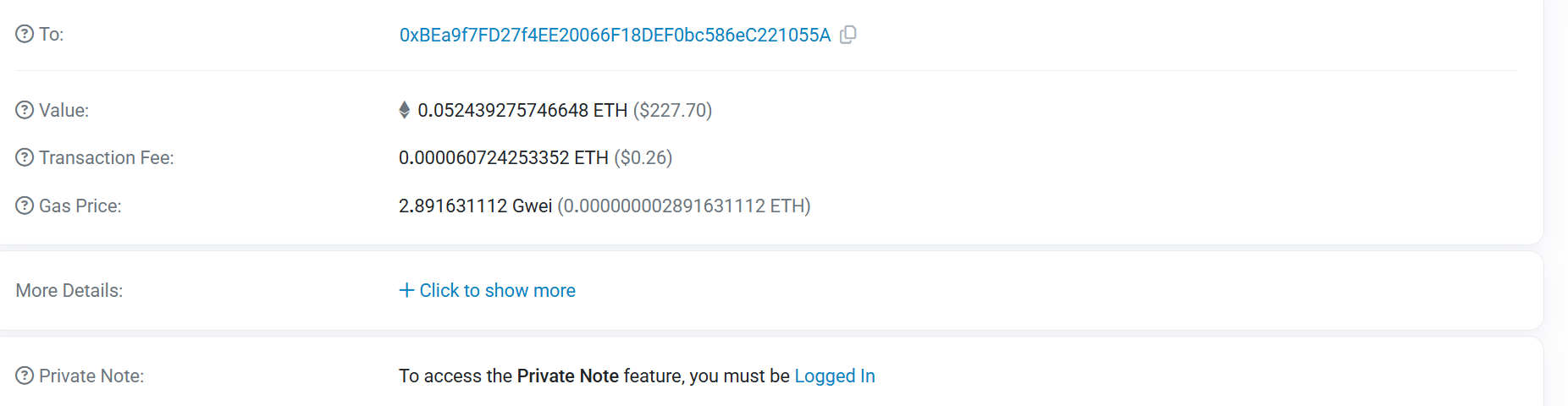
To better understand how Ethereum transactions appear on Etherscan, let’s look at a real-world transaction record. The screenshot below was taken (randomly) directly from the Ethereum blockchain via Etherscan.
It shows the step-by-step breakdown of a simple transfer of Ether (ETH) between two wallets. By examining each field, from the transaction hash to gas fees, you can see exactly how Ethereum records and confirms activity on-chain.
Example of Etherscan transaction. | Source: Etherscan
Transaction Overview
Transaction hash: 0x09ddc13b4f48b3f32d750fe86b45a00a5930a4adc57b443ecb7b242ee7069b00e. This is the unique identifier for the transaction. Anyone can use it to search for and verify this record on Etherscan. It functions like a receipt number on the blockchain.
Status: Success (i.e., the transaction executed correctly and was confirmed by the Ethereum network).
Block: #23220626. This is the block number that included the transaction. Each block contains a batch of transactions.
Timestamp: August 25, 2025, 08:50:59 PM UTC. This shows the exact time the transaction was confirmed.
Parties Involved
From: 0x2577…e4d0. The sending wallet address. This account initiated the transaction.
To: 0xBE….1055A. The receiving wallet address. This is where the Ether was sent.
Transaction Value
Value transferred: 0.052439275746648 ETH (about $227.70 at the time). This is the amount of Ether that moved from the sender to the receiver.
Gas and Fees
Transaction fee: 0.000060724253352 ETH (about $0.26). This is the fee paid by the sender to process the transaction. Validators collect these fees for confirming transactions.
Gas price: 2.891631112 Gwei. This is the cost per unit of gas. Since this was a simple Ether transfer, the gas usage and resulting fee were relatively low.
What This Transaction Represents
This record shows a straightforward Ether transfer:
The sender wallet 0x2577…e4d0 transferred 0.0524 ETH to the receiver 0xBEa9…055A.
The transfer was confirmed in block #23220626.
It was successful and cost the sender only a small gas fee of $0.26.
There were no additional actions such as token swaps, NFT mints, or complex smart contract interactions — only the direct movement of Ether between wallets.
Conclusion
Etherscan presents blockchain data in a format that can initially seem complex. Yet by breaking down its three core components — hashes, transactions, and blocks — the structure becomes clear.
Hashes function as identifiers, transactions as digital receipts, and blocks as the ledgers that hold them together.
Understanding these basics equips users with the ability to verify their own transactions, monitor wallet activity, and engage with Ethereum in a more informed way.
The transparency of the blockchain is one of its defining features, and tools like Etherscan allow anyone to access and interpret that transparency directly.
FAQs
What is a blockchain hash, and why is it essential on Etherscan?
A hash is a unique cryptographic identifier that labels items on the Ethereum blockchain. On Etherscan, you will encounter transaction hashes (identifying individual transactions), block hashes (identifying blocks), and contract addresses (identifying smart contracts). They function like digital reference codes or receipt numbers, allowing anyone to locate and verify blockchain activity.
How can I tell if my Ethereum transaction was successful?
On Etherscan, each transaction page displays a “Status” field. If it reads Success, the transaction was processed and added to a block. Failed means it did not go through, usually due to insufficient gas or a contract error. Pending indicates that it is waiting to be confirmed by validators. The block number and timestamp also confirm when it was finalized.
Why do some transactions show ‘0 ETH’ transferred?
Many interactions on Ethereum involve smart contracts rather than direct ETH transfers. For example, swapping ETH for a token or minting an NFT may show “0 ETH” under Value, but the token movement will be recorded in the Token Transfers tab. This is the best place to verify what tokens were entered or left your wallet during the transaction.
What practical uses does Etherscan have for everyday users?
Etherscan is a powerful tool for verifying and understanding blockchain activity. It allows you to confirm that your transactions were successful, track how much gas you spent, and check your wallet balances. It also helps you review project claims (such as token burns or locked funds), monitor large wallet movements, and identify potential scams. Even without coding skills, Etherscan gives users direct access to Ethereum’s transparent record.
Giuseppe Ciccomascolo began his career as an investigative journalist in Italy, where he contributed to both local and national newspapers, focusing on various financial sectors.
Upon relocating to London, he worked as an analyst for Fitch's CapitalStructure and later as a Senior Reporter for Alliance News. In 2017, Giuseppe transitioned to covering cryptocurrency-related news, producing documentaries and articles on Bitcoin and other emerging digital currencies. He also played a pivotal role in establishing the academy for a cryptocurrency exchange website. Crypto remained his primary area of interest throughout his tenure as a writer for ThirdFloor.


 Easy
Easy