Since Robinhood treats dots as unique but Gmail ignores them, attackers used dotted variations of the victims’ Gmail addresses to create Robinhood accounts.
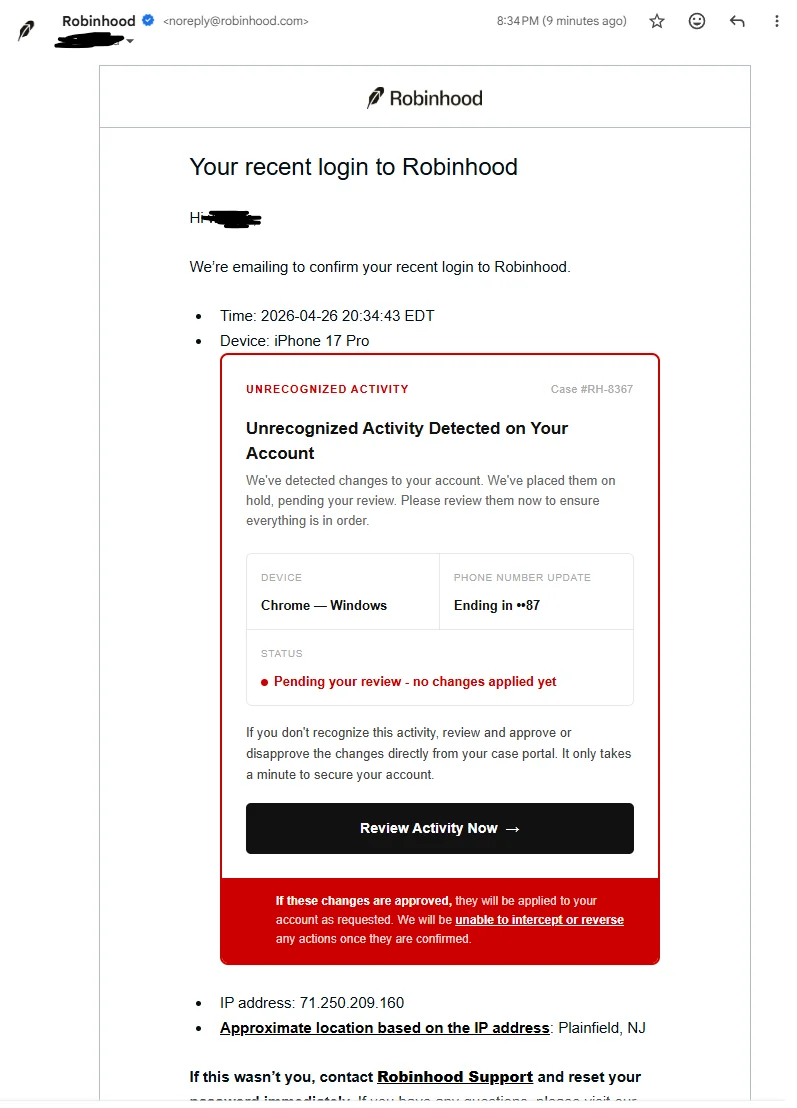
During the signup process, malicious HTML was inserted into unclean fields, transforming Robinhood’s own “recent login” emails into phishing vectors with fake ‘review activity’ buttons.
Given that emails came from Robinhood’s servers, they passed SPF, DKIM, and DMARC checks and were almost identical to actual alerts.
Following allegations around April 26, 2026, Robinhood said that it was an exploitation of their onboarding process rather than a breach.
Phishing is no longer just a game of typos and Nigerian princes. It has evolved, and now crypto owners can be one click away from a cleared-out portfolio.
In late April 2026, fraudsters sent highly convincing phishing emails that looked to be from the well-known trading platform by taking advantage of both Gmail’s long-standing dot alias behavior and vulnerabilities in Robinhood’s account setup process.
The article covers the mechanics of the Gmail alias vulnerability, how it bypassed security controls to target Robinhood accounts, and the larger implications for digital asset protection.
How Gmail’s Dot Alias Feature Works
Dots in an address’s local portion have long been ignored by Gmail. For example, [email protected], [email protected], and [email protected] all deliver to the same mailbox. Google created this tool to make it easier for users to handle issues without requiring to create additional accounts.
The majority of email providers and systems normalize or handle these differences differently. When creating an account, Robinhood’s platform did not distinguish between dotted and undotted variants, which led to an exploitable mismatch. A victim’s actual email address could be altered by an attacker to create a new Robinhood account (e.g., by adding or deleting dots). When Robinhood sent automated notifications to the new address, Gmail sent them directly to the victim’s inbox.
This technique, also referred to as the Gmail dot trick, has been around for a long time, but it gained new popularity during this campaign because it allowed platform-generated emails to be delivered without impersonating the sender domain.
From Signup to Phishing Email
The phishing campaign turned Robinhood’s systems against its users through a multi-step scheme. Here’s how it typically worked:
Account creation: Scammers identified or guessed Robinhood users’ Gmail addresses. Using a dotted version of the target email, they opened new Robinhood accounts.
HTML injection: Attackers injected arbitrary HTML code into optional fields during signup or profile setup, such as device name or browser metadata. Since Robinhood’s system did not adequately cleanse this input, the malicious material was just stored.
Triggering notifications: The fake account triggered automated emails, such as ‘Your recent login to Robinhood’ alerts from [email protected]. These emails incorporated the poisoned data, embedding fake warning text and a malicious ‘Review Activity’ button directly into the body.
Delivery and deception: Because the emails originated from Robinhood’s real servers, they passed all conventional authentication measures (SPF, DKIM, and DMARC) and even displayed the company’s logo via BIMI. Recipients received what seemed to be an official security notice about unidentified device activity.
By clicking the button, users were redirected to phishing websites that imitated Robinhood login or verification pages, sometimes using googletagmanager.com. These websites asked for usernames, passwords, 2FA codes, and even directions on how to move cryptocurrency to secure wallets under the supervision of hackers.
Example of a phishing email | Credit: @OtisAndPeanut on Reddit
Why This Phishing Attack Succeeded So Effectively
Several elements made this campaign particularly risky for the users:
Trusted sender appearance: Emails that came from Robinhood’s domain with legitimate authentication got past the majority of spam filters.
Psychological urgency: The unrecognized login pretext feeds into typical anxieties of account compromise, particularly in volatile markets where users closely monitor activity.
Technical sophistication: Attackers bypassed common red flags like mismatched domains or poor grammar by misusing platform-generated emails.
Robinhood replied promptly, declaring that no customer accounts or essential systems had been compromised, and that personal information and finances were unaffected. Users were instructed by the company to discard dubious communications and only use the app’s or website’s legitimate channels to contact help.
On Sunday evening, some customers received a falsified email from [email protected] with the subject line “Your recent login to Robinhood.”
This phishing attempt was made possible by an abuse of the account creation flow. It was not a breach of our systems or customer…
According to reports, Robinhood fixed or eliminated the susceptible “Device” field to address the sanitization vulnerability. The risk to users who clicked on the links included credential harvesting or social engineering to move assets. Such events can result in permanent losses in the larger crypto ecosystem, where connected wallets and self-custody are prevalent, if 2FA or recovery seeds are also compromised.
Protection Against Advanced Social Engineering
This event highlights that these issues will remain as long as centralized email providers rely on alias features that deviate from the logic of financial systems. Here are some practical methods to protect yourself:
Verify directly: Avoid clicking on links in emails pertaining to account activity. Manually log in via the official website or app.
Check email details: Check the entire ‘To’ address. Treat any dotted variation that you did not register with suspicion.
Enable strong security: Where possible, use hardware keys or app-based 2FA rather than SMS. Regularly monitor associated wallets and accounts.
Similar issues have historically surfaced in other services as well, proving that even well-established platforms are at risk of overlooking problem handling in edge cases.
What happens if issues continue to be ignored by platforms? Increased user skepticism, greater support costs, and possible governmental scrutiny of fintech and crypto security standards.
One mailbox can receive mail for numerous address variations thanks to a feature in Gmail that ignores periods in usernames.
How did the Robinhood scam work?
Attackers sent authenticated-looking emails that got past filters and collected user credentials by exploiting the alias vulnerability.
Is my Robinhood account safe?
As long as you haven’t given your 2FA code to a third-party website or clicked on links in dubious emails, your account is secure.
Can I disable the dot alias in Gmail?
No, the user cannot disable the dot-insensitivity because it is a fundamental part of Gmail’s architecture.
Disclaimer:
The information provided in this article is for informational purposes only. It is not intended to be, nor should it be construed as, financial advice. We do not make any warranties regarding the completeness, reliability, or accuracy of this information. All investments involve risk, and past performance does not guarantee future results. We recommend consulting a financial advisor before making any investment decisions.
Curious about how technology and crypto reshape global finance, Elizaveta Savenko explores blockchain, AI, decentralized systems, their applications, and regulatory requirements. She contributes to research, educational initiatives, and industry collaborations, examining trends in digital assets and fintech innovation, increasing awareness of the crypto space and its impact on financial systems.


 Easy
Easy