Home / Education / Crypto / Security / Binance Logins Among 149 Million Credentials Exposed in Infostealer Malware Data Dump — Here’s What You Should Know
Security researchers uncovered the TrapDoor malware campaign targeting crypto and AI developers through malicious npm, PyPI, and Crates.io packages designed to steal wallets, SSH keys, and cloud credentials. | Credit: CCN.com
Share
Key Takeaways
This was not a single company breach, the credentials were harvested from millions of infected user devices using infostealer malware.
Binance appeared in the dataset because users were compromised, not because the exchange itself was hacked.
One infected device can expose dozens of accounts, including email, social media, financial, and crypto services.
Strong user hygiene matters more than ever, including malware protection, unique passwords, and multi-factor authentication.
A major cybersecurity exposure has revealed how dangerous and widespread infostealer malware has become. Security researcher, Jeremiah Fowler, discovered an online database containing approximately 149 million stolen usernames and passwords, including around 420,000 Binance-related login records.
Although the database has now been taken offline, the incident highlights a growing global problem: cybercriminals are increasingly targeting people’s devices, not company servers, to steal access to everything from email and social media to financial and cryptocurrency accounts.
This article explains what happened, how the data was collected, why Binance users were affected, and what you should do to protect yourself.
What Data Was Exposed in the 149 Million Credential Leak?
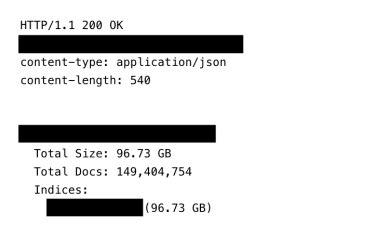
The exposed database reportedly contained about 96GB of unencrypted data, openly accessible online for several weeks before it was removed. Anyone who found the database could view, search, and download the stolen login information.
🚨 ALERT: Massive Infostealer Data Leak Exposed 149M Credentials
Roughly 149M user logins surfaced in a large infostealer dump, including around 420K credentials linked to #Binance -related accounts. Importantly, early reports confirm this was not a Binance system breach, but… pic.twitter.com/Gd0AL6Pfv7
The dataset included credentials from a wide range of popular platforms, such as:
48 million Gmail accounts
17 million Facebook accounts
6.5 million Instagram accounts
4 million Yahoo accounts
3.4 million Netflix accounts
780,000 TikTok accounts
420,000 Binance login records
1.5 million Outlook accounts
900,000 iCloud accounts
1.4 million .edu accounts
100,000 OnlyFans accounts
Total count of records and size of the exposed infostealer database. | Source: expressvpn
As observed, credentials from banking platforms, government-related domains, education systems, and many other online services were reportedly present.
Why Binance Appeared in the Leak
It is important to note that Binance itself was not breached in this incident. There has been no indication that the exchange’s internal systems were compromised.
Instead, the Binance login details found in the dataset were obtained from infected user devices, where infostealer malware captured credentials as users logged into their accounts. This means attackers likely collected usernames and passwords directly from victims’ computers or smartphones that had already been compromised, rather than from Binance’s servers.
How the Stolen Data Was Collected and Organized
The database appears to have been built using information collected by keylogging and infostealer malware, which are types of malicious software that quietly steal login details from infected computers and phones. Instead of coming from one company breach, the data was gathered directly from users’ devices over time.
What made this dataset unusual was that it stored extra technical details along with usernames and passwords. Each record included a reversed device or website identifier written in a format like com.example.user.machine. This reversed structure helps criminals sort and search stolen data more easily, grouping it by victim and source. It can also help avoid simple detection systems that look for normal website formats.
Each stolen login entry was also given a unique digital fingerprint (hash) so that every record appeared only once in the system. Checks of these identifiers showed that the records did not contain duplicates, suggesting the database was carefully organized and actively maintained.
How Infostealer Malware Works
Unlike traditional cyberattacks that target company databases, infostealer malware targets individual users.
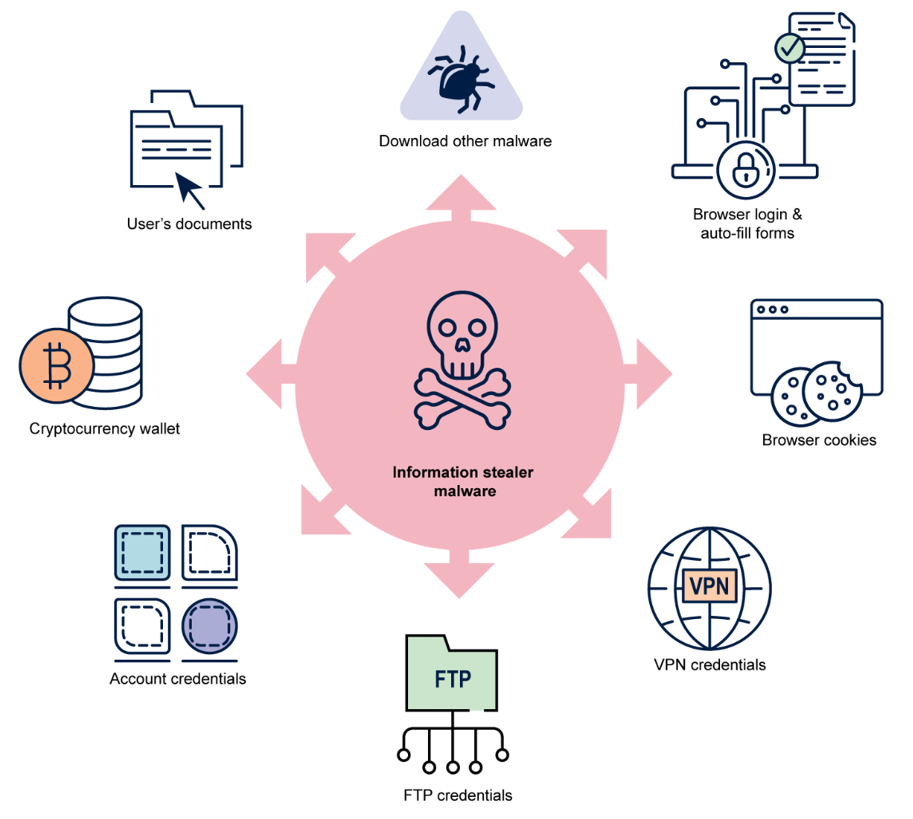
What Is Infostealer Malware?
Infostealers are malicious programs designed to secretly collect:
Once collected, this information is sent to servers controlled by cybercriminals, where it may be sold, reused, or combined into massive databases like the one recently discovered.
Because the malware runs silently in the background, many victims never realize their device is infected while their data is being stolen over time.
Why One Infection Can Expose Everything
Once a device is compromised, every account the user logs into becomes a potential target. That’s why databases collected through infostealers often contain:
The exposure of such a large number of unique usernames and passwords creates serious risks for people who may not even know their information was stolen. Because the records include email addresses, passwords, and exact login pages, criminals can easily automate attacks that try these credentials on many services.
This allows attackers to carry out large-scale credential-stuffing attacks against email accounts, banks, crypto exchanges, work systems, and social media platforms. Once inside, they can commit fraud, steal identities, drain accounts, or launch phishing scams that look convincing because they reference real services and real user details.
As a result, even a single leaked database can lead to long-term financial and personal harm for victims, especially when they reuse passwords across multiple websites.
Credential Stuffing Attacks
Cybercriminals often use stolen passwords to try logging into multiple platforms, especially when people reuse the same password across different services.
This technique, known as credential stuffing, can allow attackers to break into many accounts using a single stolen login.
Financial and Crypto Theft Risks
With access to financial accounts and crypto exchanges:
Funds can be stolen
Trades can be manipulated
Accounts can be used for laundering activities
Even if money is not immediately stolen, compromised accounts can be sold on underground markets.
Identity Theft and Long-Term Risk
If attackers gain access to email accounts, they can:
Reset passwords on other services
Impersonate victims
Access private documents and messages
This creates a long-term security risk, not just a short-term breach.
Why This Was Not a Traditional Data Breach
One of the most important aspects of this incident is that it did not come from a single company failure.
Users Were Targeted, Not Platforms
Instead of hacking Binance, Google, Facebook, or banks directly, attackers targeted millions of personal devices and harvested credentials one by one.
Sometimes stolen data becomes publicly visible due to misconfigured servers or mistakes by criminals. But many infostealer databases are never exposed publicly and are sold privately on criminal marketplaces.
This means the true scale of credential theft is likely much larger than what researchers can see.
New Infostealer Malware “Stealka” Targets Windows Users
In November 2025, security researchers identified a new infostealer malware called Stealka that targets Windows computers and is mainly spread through fake game cheats, mods, and pirated software.
The malware is often disguised as cracked software or gaming tools shared on popular platforms like GitHub, SourceForge, and fake download websites. Once users manually install the file, Stealka begins stealing sensitive data and can also install crypto-mining software in the background.
Stealka focuses heavily on web browsers, extracting saved passwords, autofill data, cookies, and session tokens, which can allow attackers to take over accounts even if two-factor authentication is enabled.
It also targets crypto wallet extensions, password managers, and authentication apps, as well as local files from wallet apps, messaging platforms, email clients, VPN software, and gaming services.
This gives attackers access to login tokens, wallet data, private messages, and even configuration files that can help them break into more accounts.
Researchers warn that because the malware spreads through trusted-looking downloads, users may not realize they are infected until their accounts or funds are already compromised.
Attackers exploited SourceForge, a legitimate website, to upload a mod containing Stealka. | Source: Kaspersky
What Security Measures Binance Uses to Protect Users
Binance employs a wide range of security tools and systems to protect user accounts and funds, especially important when credential leaks like this one occur. While stolen credentials can put users at risk, Binance’s layered defenses help detect, block, and mitigate unauthorized access attempts.
Multi-Factor Authentication and Login Protections
Binance offers several multi-factor authentication (MFA) options, including authenticator apps, SMS codes, biometrics, and support for hardware security keys such as YubiKey. These require users to enter an additional verification code or use a physical device when logging in or performing sensitive actions.
Device and Access Management
Users can review and manage devices linked to their accounts, removing any that are unfamiliar. Binance also monitors login attempts and may trigger additional verification when logins occur from new locations, devices, or unusual IP addresses.
Anti-Phishing and Email Verification Codes
Binance lets users set up a personal anti-phishing code that appears in official emails, helping users spot fake phishing messages. This code, when paired with MFA, adds an extra safeguard against deceptive login prompts.
Withdrawal Whitelisting and Transaction Limits
Binance allows users to whitelist trusted wallet addresses so that withdrawals can only be sent to approved destinations. Sudden or high-risk transactions may also trigger risk controls, requiring additional checks or approvals.
Real-Time Monitoring and Risk Detection
The platform continuously monitors accounts for suspicious activity, including unusual logins or transaction behavior. If something looks out of the ordinary, Binance can block actions such as withdrawals, notify the user, or force a password reset to protect assets.
Data Encryption and Back-End Security
User data and sensitive information are encrypted to prevent unauthorized access. Binance also uses internal risk systems and industry-standard practices to secure servers and infrastructure.
Asset Protection Measures
Beyond account login protections, Binance maintains a Secure Asset Fund for Users (SAFU) as an emergency reserve to help protect user assets in extreme events, and it uses cold storage for the bulk of crypto holdings to reduce exposure to online threats.
Together, these layers of protections help ensure that even if credentials are stolen through malware or leaks, additional safeguards can significantly reduce the risk of unauthorized access or loss.
Why User Security Still Matters Most
Even with strong platform security, if attackers already have your password and access to your email, they may still be able to take over accounts before systems detect unusual activity.
That’s why user-side protection is just as important as platform security.
Infostealer Malware Being Shared on Telegram
According to cybersecurity account Dark Web Informer, a working Python-based infostealer script was recently shared on Telegram, making it easier for cybercriminals, even those with limited technical skills, to launch credential-stealing attacks.
Infostealer Python script available on Telegram. | Source: @DarkWebInformer on X
The shared malware reportedly copies itself into system folders, hides using system-style filenames, and adds itself to Windows startup so it runs automatically. It is designed to steal saved browser passwords, collect login cookies, record keystrokes, search for personal documents, and capture screenshots when users access sensitive websites such as email, banking, or crypto platforms.
Stolen data is then automatically sent to attackers using Discord webhooks, allowing real-time access to victims’ information without needing complex infrastructure. The script also uses multiple background processes to avoid detection and continue operating quietly.
Security experts warn that the public sharing of infostealer tools on messaging platforms like Telegram is helping fuel the rapid growth of credential theft campaigns, making large-scale data leaks like the recent 149-million-record database increasingly common.
What You Should Do Right Now to Stay Safe
If you are worried about your accounts, especially financial or crypto platforms, these steps are critical.
If malware is still present, it can steal your new passwords again.
4. Use a Password Manager
Password managers help by:
Creating unique passwords automatically
Avoiding storage in browser password systems
Reducing password reuse
This limits how much damage one stolen password can cause.
5. Avoid Risky Downloads
To reduce future risk:
Avoid cracked software and cheats
Download apps only from official sources
Be cautious with email attachments and links
Most infostealer infections begin with unsafe downloads.
Cybersecurity Threats Are Shifting From Server Breaches to Personal Devices
This exposure shows that cybersecurity threats are shifting.
From Server Breaches to Endpoint Attacks
Instead of attacking big companies directly, criminals are focusing on:
Personal computers
Smartphones
Home networks
This gives them access to many services at once through a single user.
Why Passwords Alone Are No Longer Enough
Experts increasingly warn that:
Passwords will continue to leak
Devices will continue to get infected
Attackers will sometimes log in as real users
Security systems must assume credentials will be stolen and rely more on:
Behavioral monitoring
Device checks
Strong authentication methods
In today’s online world, cybersecurity starts at home, and staying alert is the best defense against becoming part of the next massive credential dump.
No. Binance has confirmed that its internal systems were not breached. The exposed Binance login credentials were stolen from users’ infected devices through infostealer malware, not from Binance servers.
How can I check if my credentials were stolen by infostealer malware?
There is no guaranteed way to check every infostealer database. However, sudden suspicious logins, password reset alerts you didn’t request, or unusual activity across multiple accounts can be warning signs. Regularly changing passwords and enabling MFA helps reduce risk.
Can changing my password stop infostealer attacks?
Changing passwords helps only after your device is clean. If infostealer malware is still active on your device, it can capture your new passwords. Always scan and secure your system before updating credentials.
Why are crypto accounts especially targeted by infostealer malware?
Crypto accounts are attractive because they allow fast, often irreversible transactions. If attackers gain access, funds can be moved quickly, making recovery difficult compared to traditional banking systems.
Disclaimer:
The information provided in this article is for informational purposes only. It is not intended to be, nor should it be construed as, financial advice. We do not make any warranties regarding the completeness, reliability, or accuracy of this information. All investments involve risk, and past performance does not guarantee future results. We recommend consulting a financial advisor before making any investment decisions.
Onkar Singh has three years of experience as a digital finance content creator. Throughout his career, he has collaborated with various DeFi projects and crypto media outlets. In his leisure time, he enjoys fitness activities at the gym and watching movies across different genres. Balancing his professional and personal interests, Onkar continues to contribute to the digital finance landscape while pursuing his hobbies.


 Easy
Easy